

From labor costs to materials, knowing the details of your cash flow is the first step to building a more efficient and profitable construction business. This lesson walks you through how to set up an accurate chart of accounts as a contractor, so you can easily track different types of income and expenses as you take on new jobs.
Introduction
When you’re analyzing your margins at the end of the month, you need information on each of the moving pieces: Are you overspending on materials? Is there extra allowance to hire more subs next time?
The foundation for answering those questions is your chart of accounts, a list of financial categories you can sort every business transaction into. When this is accurate, the rest of your operation’s bookkeeping becomes much simpler. You’ll be able to see your true costs, identify spend that isn’t producing returns, confidently price future jobs, and file your taxes correctly.
Learning Outcomes
By the end of this lesson, you’ll know how to…
Define categories for the cash inflows and outflows that map to your operation
Separate direct job costs from overhead
You’ll also leave with a starter chart of accounts you can immediately start using for construction bookkeeping.
Before We Start
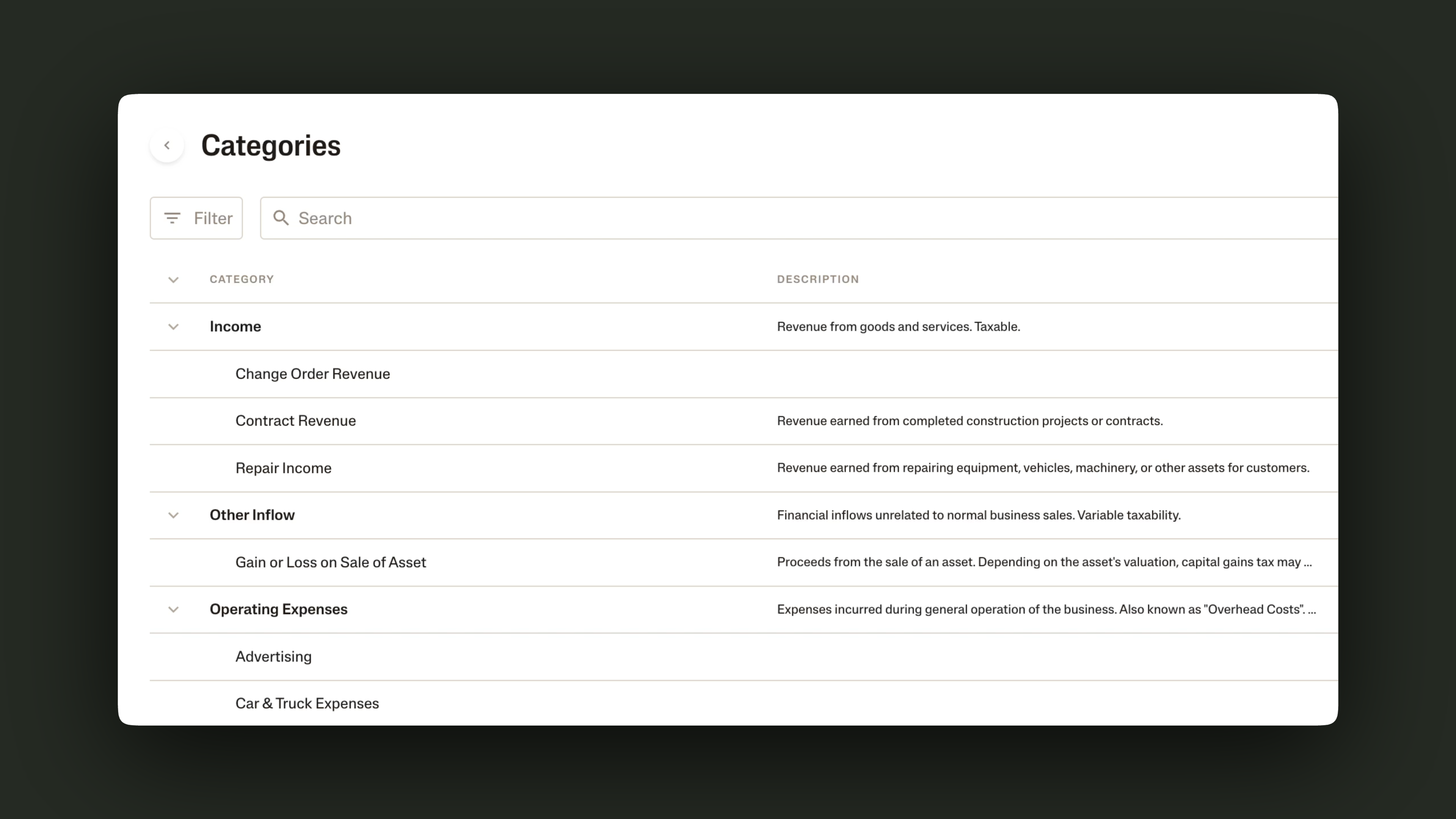
Note that a chart of accounts (COA) can refer to two parts together:
Financial categories that break down your income and expenses. For example, “Repairs” or “Subcontractors.”
A balance sheet that breaks down your assets, liabilities, and equities. This would include your business bank accounts, vehicles you own, or business loans you have, for example.
This lesson is focused on the first part, because many bookkeeping tools like Ambrook will automatically produce a balance sheet as you connect bank accounts to them. On the other hand, you’ll have to define categories yourself because they depend on how you run your operation.
Also, categories are what you’ll use day to day to track transactions and they’re the key to seeing your business’s profitability.
Let’s get started building your categories.
Step 1: Define Your Accounts
Accounts, or categories, tell you what you’re spending and earning money on. For most contractors and construction operators, the books break down into four types of accounts: income, cost of goods sold (COGS), operating expenses, and interest, taxes, & depreciation.
The table below explains what each account type means, then gives you a few examples of categories that would go under each type. These are examples we’ve seen from real contractors and construction operators at Ambrook.
| Account Type | What does this capture? | Examples from Construction Operators |
|---|---|---|
| Income | Your revenue, or the money that you receive from jobs | Repair Income, Contract Income, Change Order Revenue |
| COGS (also known as direct costs) | Money you spend that you can tie to a specific job or project | Direct Labor, Subcontractors, Workers’ Compensation Insurance, Equipment Rent, Hauling, Concrete, Metal, Supplies & Materials |
| Operating Expenses (also known as overhead or indirect costs) | Money you spend to run your business as a whole, not tied to a specific job | Liability Insurance, Office Rent, Office Supplies, Office Utilities, Software, Employee Training, Employee Uniforms, Advertising |
| Interest, Taxes, and Depreciation | Expenses or income outside your normal job costs or day-to-day overhead | Business Loan Interest, Credit Card Interest, Business Property Tax, Depreciation Expense |
Look at the examples above and think about how your transactions fit into the same or similar categories. Then, grab your pen and paper (or open up a doc), and answer these questions to start building your own list of categories:
What types of revenue streams do you want to track for your business?
What are the different operational responsibilities you spend time on?
How would you label the transactions in your latest bank statement?
Draft a list of categories based on your answers. Here are a few examples of how they might help you identify the categories your business needs:
| Example | Drafted Categories |
|---|---|
| My construction operation offers three services: repairs, remodels, and additions. I want to understand which types of jobs are most profitable and worth taking more on. | Income: Repair Income, Remodel Income, Additions Income. COGS: Direct Labor, Subcontractors. |
| I run a decking operation that builds decks with Trex composite, cedar, or pressure treated lumber. I want to track my costs for each type of material, so I’ll be able to see and improve my margins. | COGS: Materials (Trex, Cedar, Pressure Treated). |
| Other than working on the job site every week, I spend a few hours driving there and back and doing the books from my truck. | Operating Expenses: Advertising, Software, Vehicle Insurance. |
| Looking back on my week, I see I made a few fuel transactions before driving out to two different client sites and I paid our subcontractors for that decking project. | Operating Expenses: Fuel. COGS: Subcontractors. |
In the next step, we’ll work on evaluating which categories need to be broken down further, naming them, and organizing them into their category types.
Step 2: Check Category Scopes, Names, and Types
Scoping Your Categories
It can be hard to decide how granular to go with your categories. Should you track concrete, flooring, and paint as separate categories, or have one account for all materials expenses?
Imagine you offer multiple services and the type of service dictates the materials you use. In this case, maybe you want to track separate materials because it will help you understand how your services perform against each other and could inform the jobs you decide to take in the future.
In other words, you’ll want to scope your categories according to the level of financial information that would change how you act or run parts of your operation.
Naming Your Categories
You can always change the names of your accounts as your operation evolves, but try to pick ones that match how you naturally think about income and expenses (refer to your answers from Question 3 in Step 1). This makes tagging transactions much simpler when you’re recording them on a daily basis, especially on days when you have to do the books from your phone or away from your desk.
It also makes things easier for your team members. Software like Ambrook, for example, lets your crew tag transactions themselves when they use an Ambrook spending card. By naming accounts intuitively, you’ll make it easy for the whole team to help categorize the business’s income and expenses.
Understanding Account Types: Direct vs. Indirect Costs
Finally, let’s make sure your categories are slotted into the right account types. When you’re reviewing your finances, this will help you understand the broader picture of where you have money coming in and going out.
In construction, direct vs. indirect costs (or COGS vs. operating expenses) is often where account types get confusing, but it’s important to understand the difference. Once you know what falls under a direct cost, you unlock the ability to do better job costing, track budgets vs. actuals, and see per-job profitability later on. We’ll cover those workflows later in this course.
Here’s one question to help determine whether something is a direct job cost or an overhead cost: Do I pay for this on behalf of my client (or multiple clients), or to keep my operation running?
Below are a few examples of how you might break down the difference:
| Expense Category | Purpose | Category Type |
|---|---|---|
| Hauling | Bring equipment to the client’s site | Direct cost, or COGS |
| Subcontractors | Complete the client’s project faster or better | Direct cost, or COGS |
| Vehicle insurance | Protect the operation’s vehicles | Operating expense, or indirect cost |
| Advertising | Promote the operation to more clients | Operating expense, or indirect cost |
Let’s put everything together now into our chart of accounts.
Step 3: Build the Chart of Accounts
With your drafted list of categories ready to go, there are a few ways to turn it into a useful tool as you organize transactions and bookkeeping records in the future. If you use a bookkeeping software like Ambrook, you’ll create tags based on your categories. If you keep records in spreadsheets, you’ll create a final list to refer to whenever you do the books.
In Your Bookkeeping Software
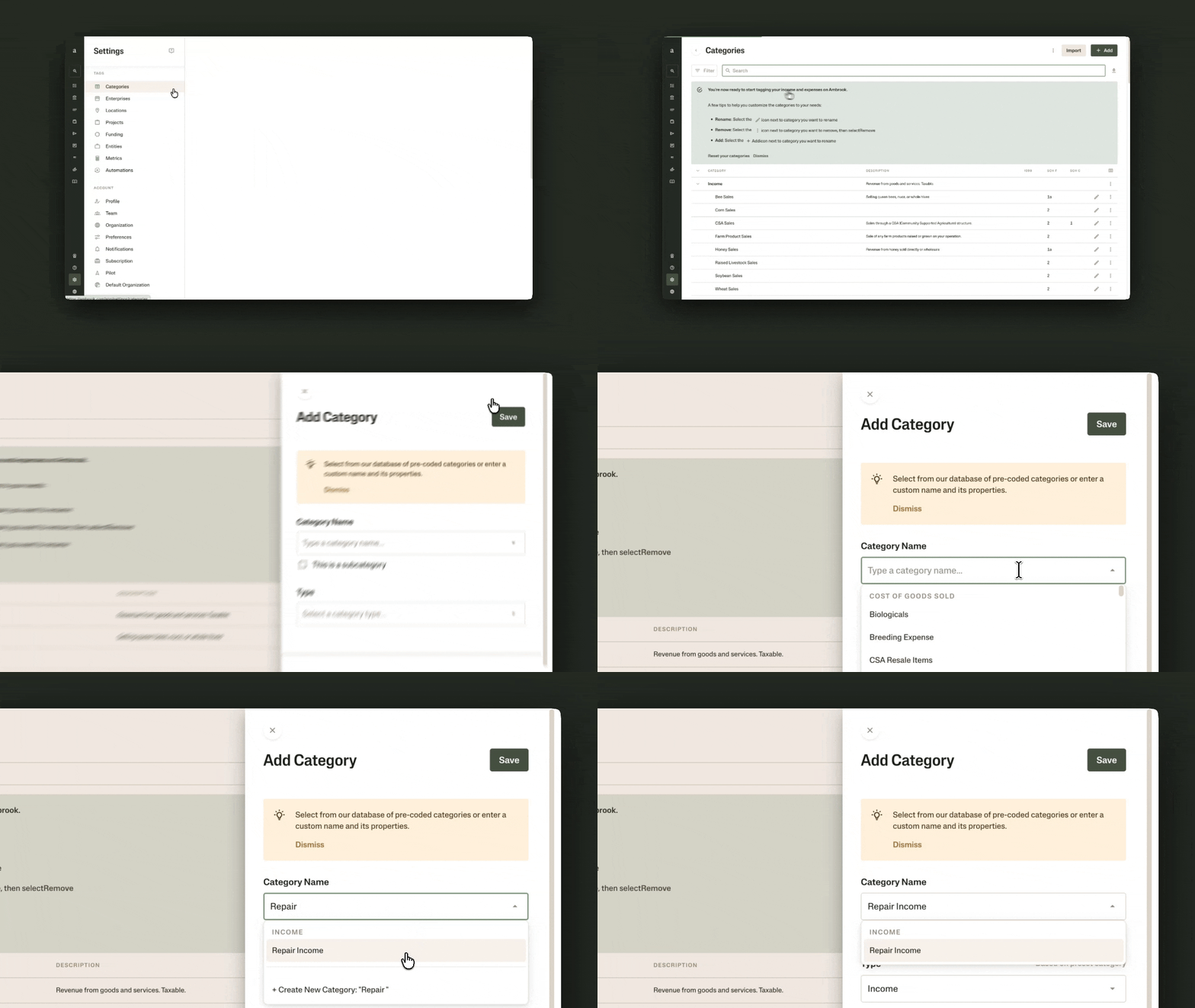
In a platform like Ambrook, your accounts become tags that you’ll use to mark transactions as they flow into your ledger.
For every account, follow these steps:
In Settings, look for Tags, then select Categories.
Select Add, then fill in the details.
Fill in Type according to the work you did in Steps 1 and 2. Is it income, direct job costs, or overhead?
Fill in the tax classifications if you know you’ll issue a 1099 (like a 1099-MISC or a 1099-NEC), receive a 1099, or file a Schedule C at tax season.
As you’re adding accounts, you might notice that Ambrook has some pre-set categories that already fit what you need. These are pre-mapped to tax classifications, so you can start using them instead of creating a new category from scratch.
When transactions come into your ledger, you’ll now see category tags to help you organize the books. Staying on top of transaction tagging will allow you to pull profit & loss reports whenever you need.
In a Spreadsheet
Use the first column of your sheet to keep track of account types: your income, direct job costs, and so on. Then, use the second column to track categories, with each one in its own row.
You should start to get something that looks like this:
| Account Type | Category |
|---|---|
| Income | Contract Income, Repair Income, Service Income, Change Order Revenue |
| Cost of Goods Sold | Direct Labor, Subcontractors, Materials, Equipment Rent, Hauling & Freight |
Download our template chart of accounts for construction and replace the categories with your own.
When you do your books, you now have a chart of accounts to reference as you mark transactions by their categories and keep track of where you’re earning and spending for your business.
Resources to Dive Deeper
Learn more about the chart of accounts in bookkeeping: why they’re important and how to troubleshoot common issues with them.
Download our template for examples of common categories in a construction chart of accounts.
FAQs
What are accounts in a chart of accounts?
Accounts (also called “categories”) help you track what you’re spending and earning money on for your business. They typically fall into four buckets: income, cost of goods sold (COGS), operating expenses, and interest, taxes, & depreciation.
As a contractor, why do I need a chart of accounts?
With a chart of accounts, you can break down your construction business’s cash inflows and outflows. This sets you up to track important metrics like per-job profitability and margins that can influence your future decisions about pricing, which jobs to take on, or where to expand your operation.
How do I structure my chart of accounts as a contractor?
Group every account under four types: income, direct job costs, overhead, and interest, taxes, & depreciation. Above all, keep direct job costs (including labor, materials, subcontractors, or equipment) separate from overhead (including insurance, office, or admin). Aim for a focused list of accounts you actually use and let your real transactions tell you which accounts you need.
What’s the difference between direct and indirect costs?
Direct job costs are costs you can associate with a specific job. Indirect costs, also called operating expenses, are what keeps your operation running whether or not a given job exists: insurance, rent, office, marketing. Keeping them separate will set you up for job costing and understanding per-job profitability later on.
How do I know whether an expense is a direct cost or overhead?
One way to understand whether an expense is a direct or indirect cost is to ask yourself whether you pay it on behalf of clients or to keep your operation running. Subcontractors, for example, are expenses you take on for specific jobs; they help you complete the work for your client faster or better. Vehicle insurance or fuel, on the other hand, are expenses you take on so your entire business can keep operating.
This resource is provided for general informational purposes only. It does not constitute professional tax, legal, or accounting advice. The information may not apply to your specific situation. Please consult with a qualified tax professional regarding your individual circumstances before making any tax-related decisions.


