

Start setting up your bookkeeping system to help you track subcontractor payments and 1099 expenses all year round.
Introduction
If you work with 1099-eligible subcontractors, keeping clean vendor records throughout the year is an important part of tax prep. Logging your payments to subs, collecting W-9s in an organized place, and knowing which expenses matter for 1099s all make tax filing an easier task when it comes around.
Here’s a record-keeping checklist to help you track 1099 expenses and organize vendor information before tax season.
Checklist Summary
Log legal and contact info. Make sure you have necessary details like EINs (Employer Identification Numbers) or mailing addresses recorded.
Gather subcontractor documents. Along with contact info for your subs, organize documents like W-9s or business licenses in one place.
Set up expense tracking. Map categories from your chart of accounts to 1099 boxes and mark the vendors you’ll need to track payments for.
Record payments with bills. Use a reliable method that’s easy to trace, like bills, to help you manage payments.
Item 1: Log Legal and Contact Info
As you prepare for reporting or tax filing, you’ll need contact information that helps identify the subcontractors you’ve worked with. You’ll save the trouble of having to track details down in a rush if you collect them early on from your subs and keep them together in one place.
In Ambrook for example, you create a vendor contact for every subcontractor where you can enter details including:
Email, phone, and mailing address
Bank account info for ACH payments
Legal business name, EIN (Employer Identification Number), or SSN (Social Security Number). Note that only admins can view contacts‘ legal information in Ambrook.
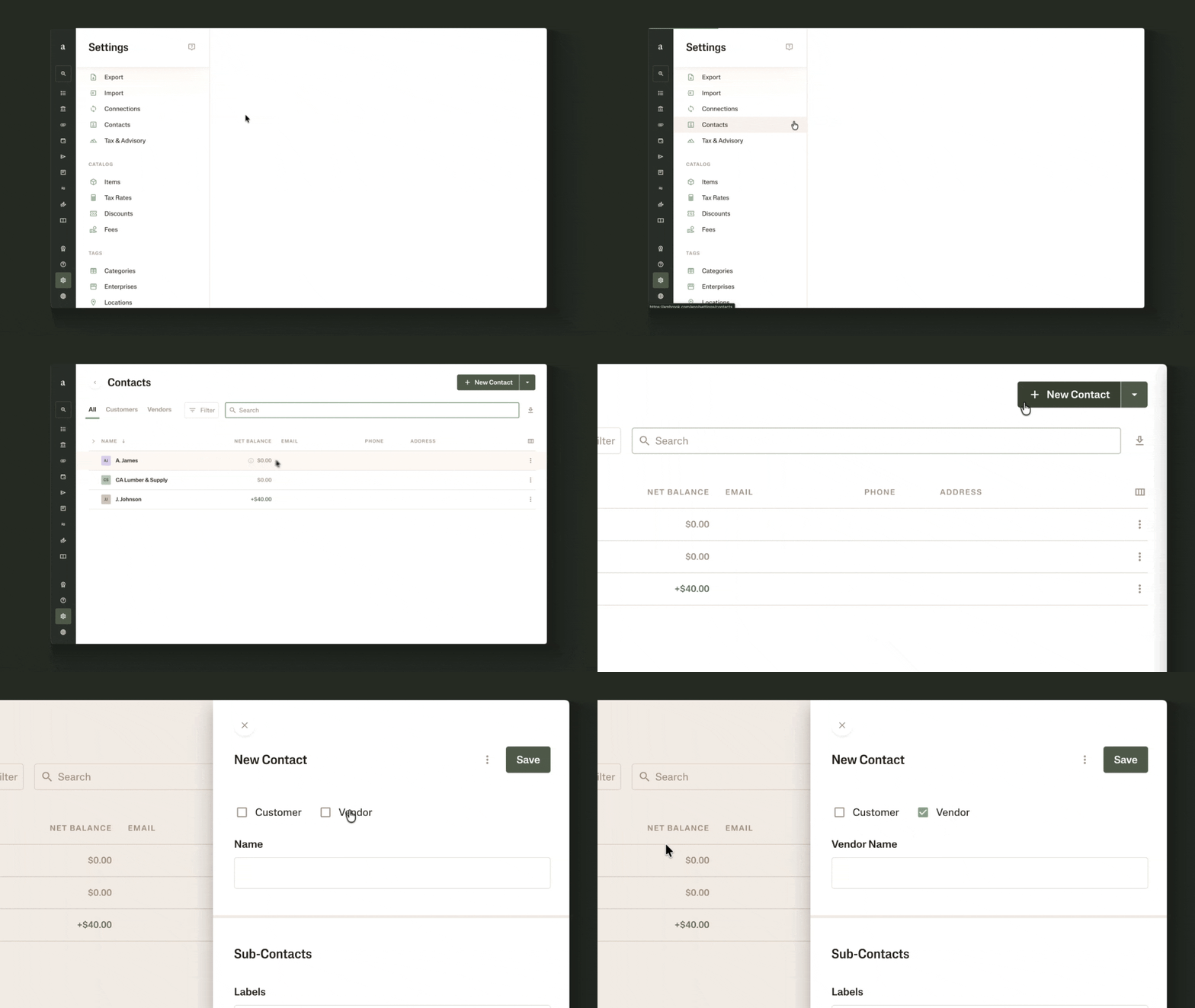
Do this by going to Settings, finding Contacts, and creating a new contact. Remember to check the box at the top marking them as a Vendor.
Item 2: Gather Subcontractor Documents
On top of legal and contact info, you’ll ideally want to keep relevant tax or business documents in the same place of record. This way, if you work with an accountant or another financial professional who needs to refer to the documentation, you have it maintained somewhere that’s easy to access.
Subcontractor documents to keep in your records could include:
Tax forms, like W-9s
Business licenses
Insurance certificates
Lien waivers
Statements of work, or other contracts you’ve signed
Your bookkeeping software might have dedicated places to help you store some of these documents and associate them with the right contacts. For example with Ambrook, you can upload tax documents and add business licenses directly to a contact.
Item 3: Set Up 1099 Expense Tracking
After you’ve gathered all the basic information and documents from your subs, you’ll need to log the expenses that will be relevant for a 1099. To do that, you should first work with your accountant to understand:
Which of your subcontractors will need a 1099?
What kinds of expenses will count for the 1099?
How will those expense types map to 1099 boxes?
From there, you can set up your bookkeeping system so you’re tracking the right expenses for with the right subs all throughout the year.
In Ambrook, here’s how to set up the system so it starts tracking 1099 payments for you. First, you’ll mark the subcontractors who will need a 1099:
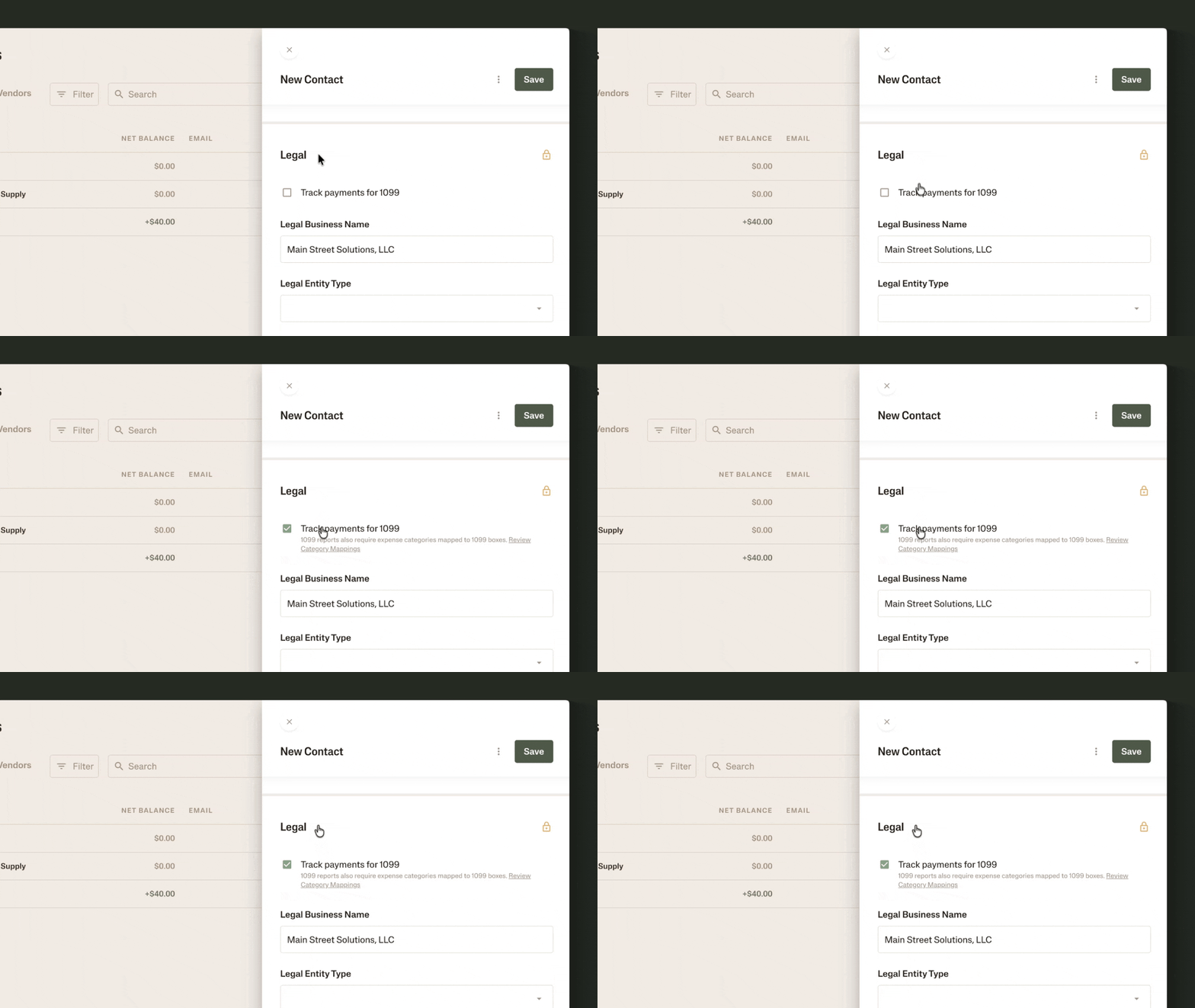
In each eligible subcontractor’s contact, scroll to the Legal section.
Check the box that says, “Track payments for 1099.”
Then you’ll need to tell the system what kinds of expenses to track. You do this by mapping the categories from your chart of accounts to 1099 boxes:
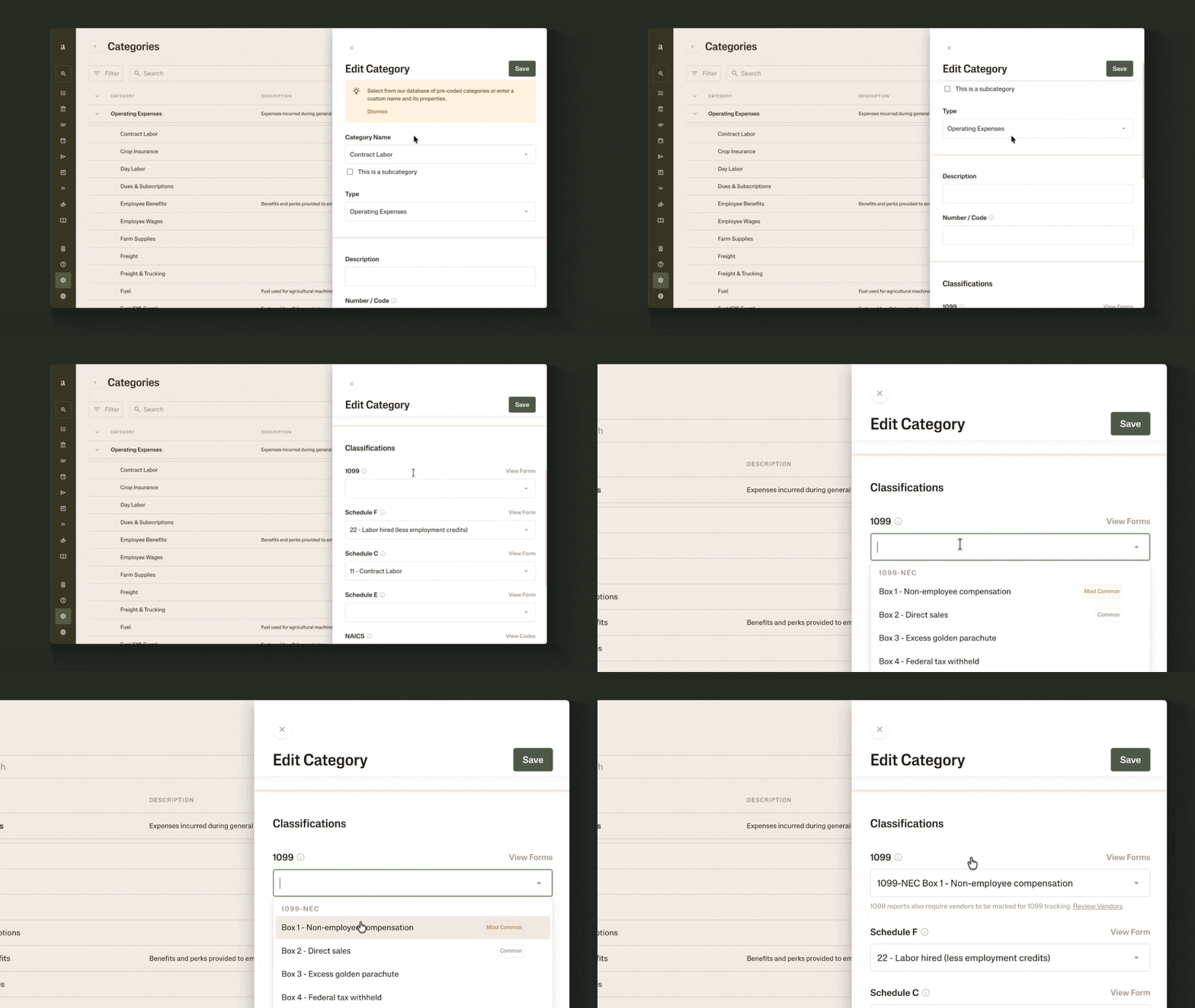
In Settings, look for Categories under the section called Tags.
For every type of expense you identified earlier as one that will count for 1099s, click the pencil-shaped icon to edit the category.
Scroll to Classifications, then select the 1099 box you want to map it to.
Now, as you tag subcontractor-related transactions in your ledger to the right categories and contacts, Ambrook will help keep track for your 1099s.
Item 4: Record Payments with Bills
Another part of maintaining neat records for your vendors is creating a repeatable workflow to manage payments. This could look like a spreadsheet where you log every time you pay a subcontractor, or it might be a bill pay software.
For example, you can create bills for each of your subcontractor payments in Ambrook. This allows you to record the vendor, tag the expense category, then make an ACH or check payment all from a single place. If you have 1099 payments tracking set up for that sub and that particular category, Ambrook will keep track of it as a 1099 expense.
Depending on how subs bill you, you can this record-keeping process even easier by:
Setting up a forwarding address, so Ambrook automatically drafts bills from your email in the future
Taking photos of paper bills to quickly convert them to digital records in Ambrook
At any point, you can also visit your Bills page to see and search through records of the payments you’ve made to subs.
A 1099 Payments Report to Help You Prep
You’ve got contact info and documents logged, expense tracking set up, and subcontractor payments recorded. At year’s end, if you’re using bookkeeping software like Ambrook, you can now export a 1099 payments report:
Go to Settings and find Export.
Scroll to Tax Prep and select 1099 Payments.
Download the report and see a summary of payments you made to vendors, by the 1099 box they were mapped to.
As you work on filing your taxes and 1099s next season, you’ll have a point of reference to help you and your accountant prepare.
Note: The 1099 Payments Report is for your reference. Ambrook does not print or file 1099s for you.
Resources to Dive Deeper
Bills from subcontractors are part of your accounts payable (AP). Learn more about how AP works and how to manage it effectively.
Read about how to make bill pay more efficient.
FAQs
How do I track 1099 payments for subcontractors?
Work with your accountant or financial advisor to understand which subs might need 1099s and what types of payments to track for 1099s. Then in bookkeeping software like Ambrook, you can mark those vendors as ones to track payments for and map the relevant expense categories to 1099 boxes. This way, the system will help you keep track as you tag transactions to the right categories and contacts from your ledger.
What documents should I keep on file for subcontractors?
Operators typically keep documents like W-9s, business licenses, insurance certificates, and signed contracts with subs on file. Depending on state, contract, or licensing board requirements, some may also keep lien waivers on record. Talk to your accountant and financial professionals you work with about the documents you should gather from your subs.
Where should I keep subcontractor documents?
Try to keep subcontractor records organized in one place, so you can easily reference them later when you prepare for tax filing. In a platform like Ambrook, you can upload a vendor’s tax documents and business licenses directly to their contact so you can keep information together.
How can I see how much I’ve paid a subcontractor?
In Ambrook, if you’ve set up payments tracking for 1099s and mapped your categories to 1099 boxes, you can later export a 1099 payments report to see a summary of your payments to relevant subcontractors. Alternatively, if you’re creating bills for your subcontractor payments, you can export a vendor statement or expenses by vendor from the Export page.
Why should I use bills to pay subcontractors?
Bills can make it easier to track your payments: which vendor you paid, how much, the expense category, and any related attachments. And if the bill’s vendor and tags match contacts and categories you’ve set up for 1099 tracking, the payment will count toward that sub’s tracked 1099 payments.
This resource is provided for general informational purposes only. It does not constitute professional tax, legal, financial or accounting advice. Consult a qualified professional about your specific situation.


