
Build a report in ChatGPT that analyzes your operation’s ledger and helps you prepare for the upcoming week. From a transaction analysis to an aging AR/AP report, in this lesson we’ll cover how you can use AI to understand your weekly cash flow.
Introduction
We’re seeing more Ambrook customers experiment with AI as part of their bookkeeping and financial planning routines. It’s helped them stay in control of their numbers without having to manually dissect every line item week after week.
Inspired by them, we’ll take you through the steps of building your own financial health report using ChatGPT. You’ll train an AI system to read, analyze, and summarize your operation’s finances, but never to make changes to your numbers. And you’ll learn how to set up the report as an AI skill, so you can automatically run it whenever you need it.
Learning Outcomes
By the end of this module, you’ll know how to…
Build a skill in ChatGPT
Safely connect your books to an AI chat
Teach AI how to understand your operation and bookkeeping structure, so it provides accurate analyses
You’ll walk away with a functional report you can start using right away.
Before You Build
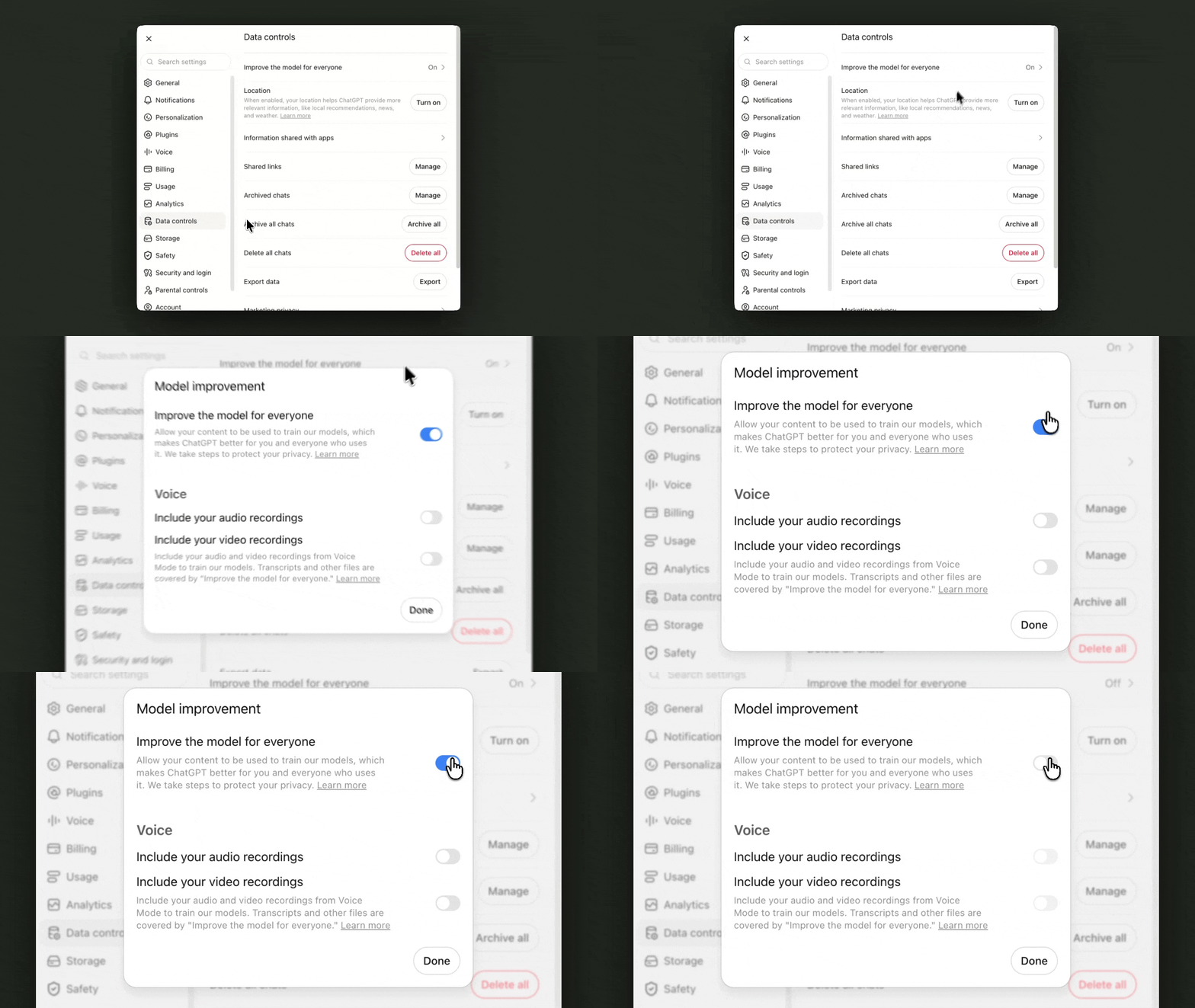
One way to keep your data safe when using AI tools is to disable controls that allow AI to train its technology on your chats.
A few notes before you start building your AI financial health report.
Pick an AI tool that works for you. We’ll show you the steps for this module in ChatGPT, but you can apply them to Claude or another tool you like to use.
Keep your financial data safe. There are always risks when you share real data from your operation with an AI tool. Here are some tips to help you control how AI uses your data:
Use AI with an account you’ve created yourself and can reliably access from your own email. Avoid using AI tools from shared or public accounts.
Enable multi-factor authentication (MFA) to add an extra security step whenever you log into your AI tool. In ChatGPT, you can do this by going to Settings, then navigating to Security and selecting an option under Multi-factor authentication.
Don’t paste your financial data into public chats, shared prompts, or anywhere the conversation isn’t private to you.
Turn off settings that allow AI tools to train the technology on your data. In ChatGPT, you can do this by going to Settings, then navigating to Data Controls and turning off the toggle to Improve the model for everyone.
Above all, use your judgment when it comes to sharing information with any kind of AI tool. If you think you’re inputting data that could reveal highly sensitive or personal details about you or those you work with, avoid sharing it at all.
With that, let’s create a financial health report in ChatGPT.
Step 1: Know What You’re Building
Before you ask AI to do anything, it’s important to understand what you want it to do. A clear prompt is easier for AI to follow, which makes it more likely to give you the right information.
What makes a financial health report useful for your operation? For this lesson, we’ll start by defining two specific pieces of information for AI to put together:
An analysis of recent transactions. What came into business accounts, what went out, and what looks unusual compared to previous weeks?
An aging AR/AP report. Who owes you money, who do you owe money to, and which invoices have you been waiting on the longest?
Tip: Start small, then grow. When you work with AI, start by giving it just a few specific and well-defined tasks to complete. Once you trust it can do them correctly, you can add additional tasks.
Now that we know what we want to build, let’s get right to it.
Step 2: Connect Your Books
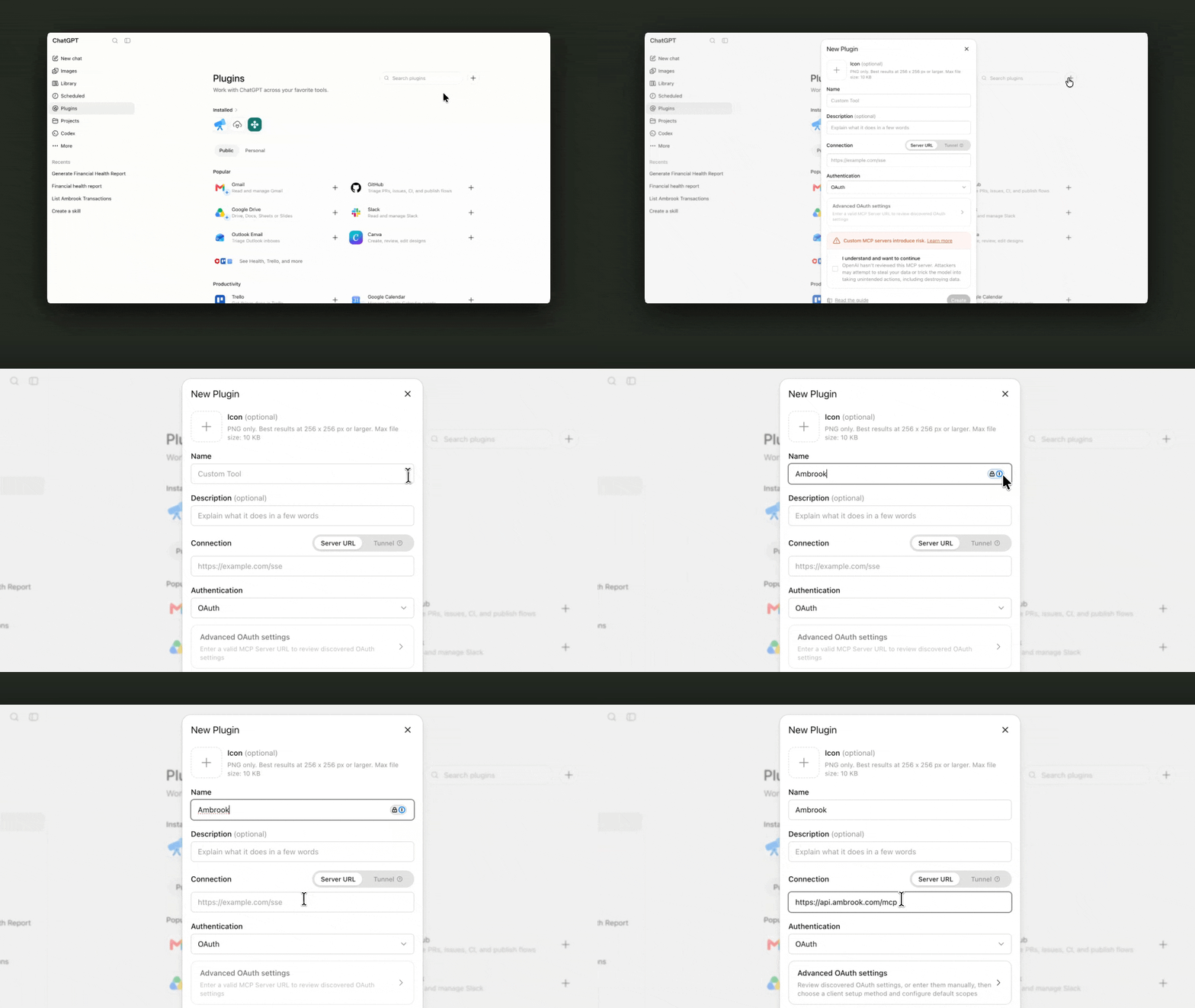
Connecting your accounting software to ChatGPT via MCP allows it to directly read your books.
To report on your operation’s financial health, ChatGPT will need access to the right data. One way to share your books with ChatGPT is through a connection called the Model Context Protocol (MCP). If your accounting software has an MCP server, it means you can install a plugin in ChatGPT that allows AI to read your books directly.
As an example, here are the steps to connect the Ambrook MCP to ChatGPT. You’ll need a ChatGPT Plus, Pro, Business, Enterprise, or Edu plan to do this.
On chatgpt.com in your web browser, click your profile picture. Then, find Settings and select Plugins.
Go to Developer mode and toggle it on.
Navigate back to Plugins and click the “+” button to create a new one.
Fill in the following information for the new app:
Name: Ambrook
Authentication: OAuth
Click Create, then sign in to your Ambrook account when prompted.
Review and approve the access you’re giving ChatGPT to your Ambrook account.
If the connection fails or isn’t found, your Ambrook account may not have the MCP feature turned on yet. Contact our support team who can help enable it.
Safety check: Some plugins give ChatGPT the ability to both read and edit data in external apps. Always confirm the level of access ChatGPT has to your connected software, so you know how to safely interact with AI tools. Remember that you can disable plugins or remove permissions at any time in your plugin settings.
With your books connected via MCP, ChatGPT can pull and analyze the numbers right from your accounting software. You won’t have to manually upload CSVs of your transactions or invoices in the chat.
Now, we’re ready to start designing the report itself.
Step 3: Create Your Skill
We want ChatGPT to be able to run this financial health report on demand, so we’ll create a skill for it. This means ChatGPT will remember the instructions to generate this report in the future.
Start by typing @skill-creator into the chat. This is a default instruction that tells ChatGPT you’d like to build a skill. Then, draft a prompt to tell it what the skill is for. There are four key elements to writing a clear prompt.
1. Persona
Explain who you are, so ChatGPT understands your goals for the report.
I’m the owner-operator of Ambrook Construction. I build residential decks and patios, and I want to have a clear picture of my cash flow, client invoices, and bills to pay each week.
2. Task
Describe what you want ChatGPT to do.
Build a financial health report that helps me review the past week’s books. To do that, analyze: 1. The past week’s transactions, flagging anything unusual in size, category, or timing compared to my transactions over the previous 8 weeks. 2. AR/AP aging, pointing out what’s overdue, both money owed to me and money I owe.
3. Context
Tell it which data to base the report on and name the plugin it can use to access that data.
To generate the report, review my transactions, unpaid and overdue invoices, and unpaid and overdue bills in Ambrook.
4. Format
Describe how you’d like the report presented (as a single paragraph, in a few bullet points, etc.). If you like visual reports, try having ChatGPT return its analysis in an HTML file. You can also designate a name for your skill.
Present the information in an HTML dashboard that summarizes what’s healthy, what to watch out for, and what needs action. Include a prioritized view of the top 5 things that need my attention this week. Name this skill “financial-health.”
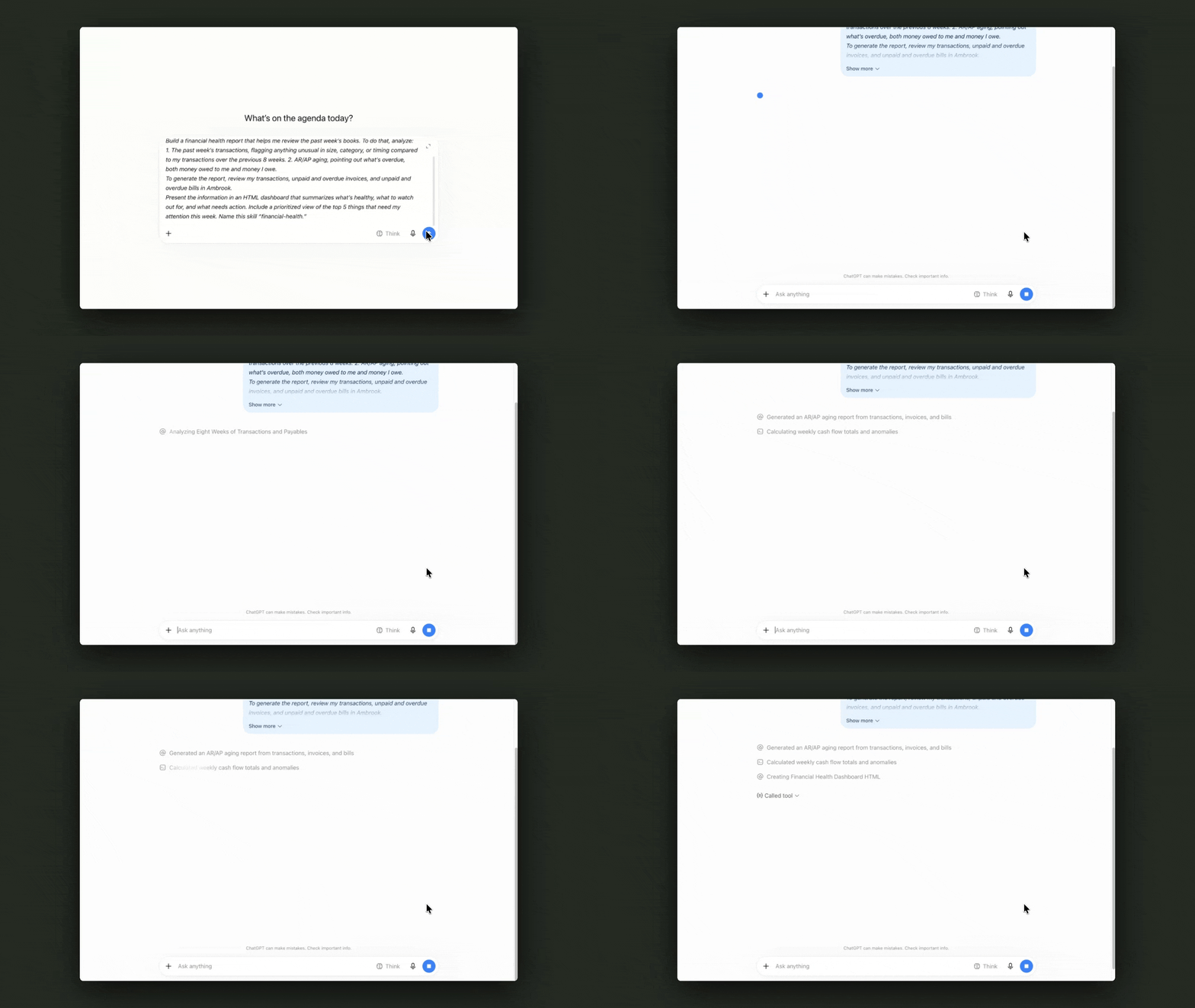
Put together, your prompt will look something like this:
@skill-creator I’m the owner-operator of Ambrook Construction. I build residential decks and patios, and I want to have a clear picture of my cash flow, client invoices, and bills to pay each week.
Build a financial health report that helps me review the past week’s books. To do that, analyze: 1. The past week’s transactions, flagging anything unusual in size, category, or timing compared to my transactions over the previous 8 weeks. 2. AR/AP aging, pointing out what’s overdue, both money owed to me and money I owe.
To generate the report, review my transactions, unpaid and overdue invoices, and unpaid and overdue bills in Ambrook.
Present the information in an HTML dashboard that summarizes what’s healthy, what to watch out for, and what needs action. Include a prioritized view of the top 5 things that need my attention this week. Name this skill “financial-health.”
ChatGPT might ask you clarifying questions as it uses your instructions to build the skill. Answer them to the best of your ability, but keep in mind you can always make changes later on.
Step 4: Test and Improve
Using your prompt, ChatGPT will start creating the skill and let you know once it’s ready to test. When it’s done building, type @financial-health (or the name you chose for your skill) in the chat to run it for the first time.
AI often doesn’t produce a perfect result on the first try, so you’ll want to check its work and give it additional instructions to refine the skill. Here are some examples of criteria you can use to evaluate the first report it generates:
Is the information accurate? Pick one data point from the report, like a transaction ChatGPT flagged or an invoice it says is unpaid. Open your accounting software to check whether it matches what you see yourself. If it doesn’t match, ask ChatGPT to explain how it got that number or information.
Are the insights useful? Consider whether you have helpful next steps based on the information from the report.
Is the format clear? Think about how much time and effort it would take you to read the report each week. Can you easily digest it in 10 minutes on a Sunday night, or will it add an hour of extra work to your plate?
Based on your answers to those questions, provide your feedback to ChatGPT so it can improve the skill and get the report closer to what you want. For instance, you can try these prompts:
| If the report is… | Tell ChatGPT… |
|---|---|
| Pulling the wrong data | You looked at transactions from the wrong week. Each time you run the skill, ask me to confirm the dates of the week I’d like you to review. |
| Too long | This is too long. Start by listing the main things that need my attention, then go into the details. |
| Missing information | Add a line at the top of the report stating total cash in and total cash out for the week. |
| Difficult to read | Use bullet points so the report is formatted in a way that’s easier to scan. |
It’s normal to go through multiple rounds of feedback. With each round, keep using @financial-health to generate new versions of your report until ChatGPT produces an accurate result that you’re happy with.
Download our sample AI report for a formatting and visual reference. Share it with ChatGPT as a guide for your AI skill.
You now have a ChatGPT skill to help you monitor your operation’s financial health week to week, and you can re-run it anytime by calling @financial-health in a chat or asking ChatGPT to run the financial health skill.
As you use this to help review your transactions and stay on top of AR/AP, remember that AI can be confidently wrong at times. It can be a useful tool to help you make sense of the numbers, but it can’t make final calls on business decisions.
Finally, skills aren’t set in stone. You can always ask ChatGPT to make updates to its instructions, so your financial health report continues to evolve and scale with your operation.
Resources to Dive Deeper
Download our sample AI report as a reference to show ChatGPT or give you more ideas as you’re refining your AI skill.
Read how the Ambrook team uses AI safely, including our internal curriculum to help team members build with AI.
Learn how operators like Robbie Gianadda, owner of Flat 12 Mushrooms, and Nathan Wood, owner of Wood Farms, are experimenting with AI for financial planning.
FAQs
What is an AI skill?
A skill is a reusable set of instructions that tells an AI tool how to perform a specific workflow or task. Once you create and save a skill, you can ask the AI tool to automatically run it again in the future.
What is an MCP?
MCP stands for “Model Context Protocol.” It’s a connection that lets an AI tool talk to another software system, so it can access data directly from that platform instead of you exporting the data and sharing it by hand. For example, if you used an MCP to connect ChatGPT with your accounting platform, you could ask ChatGPT questions about your books and it would directly pull the numbers from your platform.
How do you connect external apps to ChatGPT?
If an external app has an MCP server, you can connect it to ChatGPT by installing it in the plugin directory. Some apps may have specific connection instructions. If you use Ambrook and need help connecting it to an AI tool, you can contact Ambrook support.
How do you keep financial data safe when using AI tools?
Keep your financial data safe by using AI tools with your own, private account and enabling multi-factor authentication (MFA) for more security. Also, turn off settings that let AI tools train their technology on your data and avoid sharing information that could reveal highly sensitive details about you, your operation, or those you work with.
What are the four key elements of an effective AI prompt?
An effective AI prompt covers your persona (who you are and your goals for what you’re requesting), the task (what exactly you want AI to do), context (how AI can access the right data to complete the task), and the format (how AI should present its work to you).
This resource is provided for general informational purposes only. It does not constitute professional tax, legal, or accounting advice. The information may not apply to your specific situation. Please consult with a qualified tax professional regarding your individual circumstances before making any tax-related decisions.