
While AI can’t make final decisions on the right funding for your operation, it can be a helpful tool for sourcing opportunities and getting an application started.
Introduction
There are hundreds of grants out there for small businesses, all the way from the federal level down to local, private, and nonprofit programs. This can make the application process overwhelming, especially when you’re rushing to make a tight deadline.
Previously, we’ve written about a few ways to make the process easier. We have a guide on finding the right opportunities for your operation and making the application process more efficient, where we shared tips on creating a budget, searching for programs, and deciding whether to work with a grant writer.
In this lesson, we’re building on those guides. We’ll walk through how to use that information to build a simple AI agent for grant applications, from helping you source and identify programs that make sense for your business, to drafting the initial language for your application.
Learning Outcomes
By the end of this lesson, you’ll know…
The difference between an AI skill and an AI agent
How to set up a simple AI agent in ChatGPT that can run on its own
How to train AI on your business goals and context
You’ll walk away with an agent you can fine-tune and try out for your next round of applications.
Tips for Using AI Safely
Before we get started, review our tips for using AI safely from a previous lesson: Review Your Ledger Faster with AI Tools. They include notes on enabling multi-factor authentication for your account, turning off settings that let AI train its technology on your chats, and checking the permissions you’ve given to any plugins you use.
Once you’ve read those tips, come back to start building your AI agent for grant applications.
Step 1: Understand Skills vs. Agents
In our previous lessons on AI for financial management, we created AI skills. These are sets of saved, repeatable instructions that you tell an AI tool to use, in order to perform a well-defined task. For example, you might tell it to run a financial health report for the week or to review your ledger.
AI agents are systems that can operate independently to accomplish a particular goal you’ve given them. Typically, agents are able to do things on their own like:
Break up the goal into intermediate steps, then carry them out one by one
Decide which skills or tools it needs to accomplish the goal, and use them
Remember information about your operation or previous iterations of a task it completed
Run on a schedule or based on a condition, without you having to explicitly ask it to do so
Here are a few examples of the differences between skills and agents.
| Trait / Activity | AI Skills | AI Agents |
|---|---|---|
| Runs | You ask your AI tool to run the specific skill you’d like to use | The agent is triggered on a schedule, or runs on its own based on a condition you set |
| Memory | Doesn’t usually remember unless you give it previous context | Typically has a place to store memory about previous runs (for example, a document it can retrieve, reference, and update each time) |
| Scope of work | Typically a narrowly defined task with set instructions and tools to use | Independently coordinates the steps, skills, and tools needed to reach a set goal |
| Example use case | You have a repetitive task that comes up at different times or in different situations | There’s regular research, information-gathering, or a more complex action you want to kickoff at the same time every week |
Our grant application agent will be a simple version of an AI agent that:
Researches grants on a weekly basis
Picks three opportunities that seem like a good fit for your operation
Drafts a brief blurb explaining why your operation and projects are a fit for the grant (that you can repurpose as you write the full application)
Lists all the documents you’ll need for the application
With that in mind, let’s start by setting up a source document.
Step 2: Create a Source Document
Before we start giving AI information on what to do, we need a place that can act as its “memory.” This is oftentimes a document that the AI agent can reference or update every time it runs its task; it contains information that will help the agent continue to perform the task well going forward.
Open a Google Doc and add two separate sections to it:
Projects & Budget: Follow Steps 1 and 2 in this guide to build the list of projects you want funding support for, along with the budget you’ve set.
Grants Log: Create a table that ChatGPT can update after each run to keep track of grants it has already suggested to you. This way, the agent will avoid proposing the same opportunities week after week.
Here’s an example of what your grants log might look like, with columns for Grant Name, Grant Deadline, and Date Suggested. (Note that this is meant to be a formatting reference, and rows may not contain accurate program names or deadlines.)
| Grant Name | Grant Deadline | Date Suggested |
|---|---|---|
| NRCS Environmental Quality Incentives Program | Continuous | Sep 22, 2026 |
| Farm Credit East, Ag Educator Scholarships (CASE) | Continuous | Sep 8, 2026 |
| Bank of North Dakota, Ag Commodity Export Enhancement Program | Continuous | Sep 8, 2026 |
Finally, make sure you’ve connected the Google Drive plugin to ChatGPT so your AI agent can access this source document directly. You’ll need to enable both read and write access for the agent to see projects, budget, and update the log.
Tip: To review what plugins are, how they work, and giving them access to external apps, go to our previous lesson on building a financial health report in ChatGPT.
Step 3: Build Your Scheduled Task
Now, it’s time to craft our prompt for the AI agent. This will give the agent its goal, point it toward helpful context it can use to achieve the goal, and tell it how to take action.
Since we’re building a simple agent that runs on a weekly schedule, we’ll do this all in the form of a scheduled task. Here’s how that works in ChatGPT:
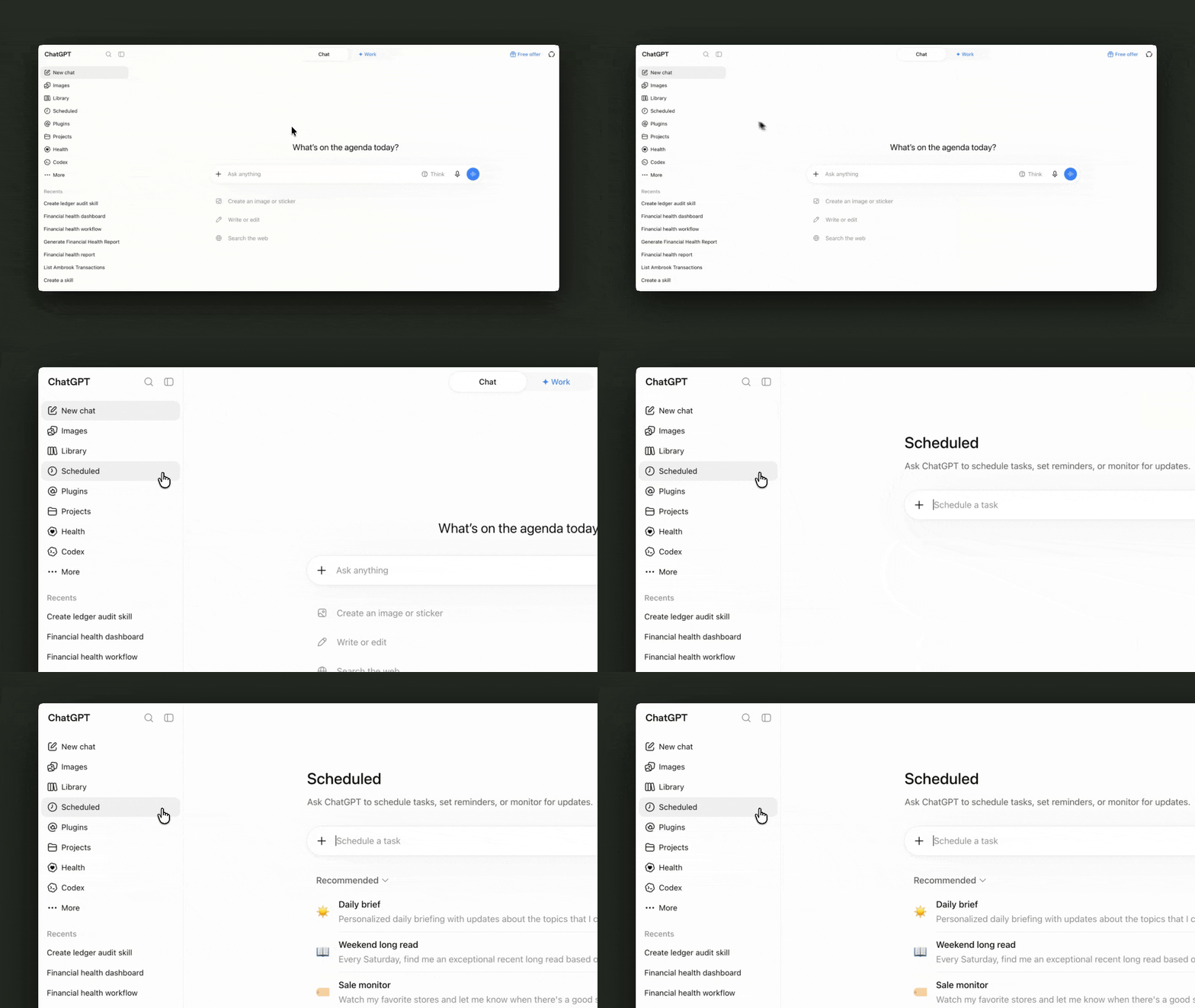
In the left menu bar, find Scheduled.
Start typing your prompt in the chat box to Schedule a task.
Reuse the four elements of an effective AI prompt from our previous lessons.
Persona: Describe who you are, why you’re looking for funding for your operation, and why you need an AI agent to help. Is it to make the grant application process faster, or find grants that fit your business better?
Task: Explain that ChatGPT should research grants that fit your operation’s industry and project needs. It should then help you get started on grant applications for the top three opportunities it identifies, without repeating grants it has already suggested.
Context: Give it access to sources that might be helpful for its research. For example, the Ambrook funding library, online guides to finding funding or applying to grants, your source document, and your books via Ambrook MCP.
Format: Tell it how you’d like its findings presented, and when. Do you want it in an email, or maybe in an HTML report every Monday morning?
Make the prompt precise when you have specific expectations. For example:
If “starting on grant applications” means you’d like to get the first draft of a 5-7 sentence executive summary for each grant, you can specify that.
Ask it to return a complete list of business documents or other requirements for every grant.
If you’d like the grants log in your source document to get updated after every run, remember to tell AI exactly which part of your document to edit and when.
For a grant application agent, you likely also want to include where your operation is located or other factors that would affect the grants you look for.
Tip: For a reminder on how to connect your books in Ambrook to ChatGPT, check out our previous lesson on building a financial health report.
Step 4: Test Your AI Agent
You now have the first version of a simple AI agent for your grant applications that can run on its own schedule. But before it starts doing grant research every week, have ChatGPT perform a test run of your task and evaluate the results to improve the agent.
Here are some example questions you can ask to check AI’s work, plus ways you might change your prompt or source document accordingly.
| Question | Example Next Step |
|---|---|
| Are the grants AI picked for you from the right region or state? | Add more context about your operation, location, and business needs in the task prompt. |
| Is your operation eligible for the grants AI picked? | Ask AI to describe its sources and how it determined your operation’s eligibility for grants. |
| Does the sample blurb show a good understanding of your operation, business goals, and projects? | Edit the projects and budget in your source document with more detail. |
| Did AI actually update the grants log in your source document? | Check instructions in the task prompt about updating the source document after a run. |
As you refine the task prompt and your source document with feedback for ChatGPT, you’ll get closer to an agent that can consistently identify opportunities that really match your operation.
Landing on the right funding for your operation can be a delicate balance of timing, opportunity, and business goals. With this first version of a grant application AI agent, you can spend more of your own efforts on crafting the best application possible for more opportunities.
Resources to Dive Deeper
Review our guides to finding and tracking funding for your operation.
Learn more about AI agents the Ambrook team has built across our sales and engineering teams.
FAQs
What’s the difference between a skill and an agent?
A skill is a saved set of instructions that you explicitly trigger in an AI chat. Skills are usually more narrowly scoped to a particular workflow or smaller task. An AI agent is a system that runs on its own based on a schedule or a condition, can keep memories across runs, and coordinates several steps to reach a broader goal.
What are example use cases for AI skills vs. AI agents?
Example use cases for AI skills are straightforward tasks or workflows you often repeat, but may not do on a regular cadence. For instance, a skill for editing emails to vendors or your accountant. AI agents tend to be for more complex processes that happen on a regular clip, like an agent that always monitors your email inbox for messages from your accountant and routes them to a priority folder.
Can the agent write and submit the whole grant for me?
In this lesson, the AI agent we built doesn’t have the ability to write an entire grant application and submit it. It helps you source opportunities and get started with a blurb, but you still need to review the grants it picks, craft the application, and make the final call on funding for your business.
Is a grant the right kind of funding for me?
Not always. Grants can be competitive and more restrictive, which is why they’re often great fits for conservation, research, or community projects. If you’re looking for seasonal cash flow, an operating loan or line of credit might be better. This is why you want to give the grant application AI agent access to information on your projects and budget, but also guides to weighing your capital stack.
This resource is provided for general informational purposes only. It does not constitute professional tax, legal, or accounting advice. The information may not apply to your specific situation. Please consult with a qualified tax professional regarding your individual circumstances before making any tax-related decisions.